



CrateDiggz
Dig your whole sample library in plain words, play it as an instrument, kit it, and build the song, all inside your DAW.
AU · VST3 · CLAP // macOS (Apple Silicon + Intel) · Windows
Interface preview · Dig · Play · Kit · Song · linked to Logic, A minor, 92 BPM
Why Diggz
Your sounds are spread across drives, packs and old projects, and finding the right one kills the vibe. Crate Diggz maps the whole crate, hears your session, and takes you from the find to a finished song.
Describe it. Find it.
Search the whole crate the way you'd say it out loud.
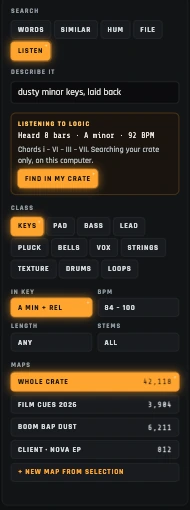
- Search by words, similar sounds, hum a melody, drop in a file, or listen to what's playing.
- Listening to Logic: it hears 8 bars, the key, the BPM and the chords (like i–VI–III–VII) and searches your crate only, on this computer.
- Filter by class (keys, pads, bass, leads, plucks, bells, vox, strings, texture, drums, loops), key with relatives, BPM, length and stems.
- Maps for the whole crate or a project: Film Cues, Boom Bap Dust, a client EP, or a new map from any selection.
See the whole crate.
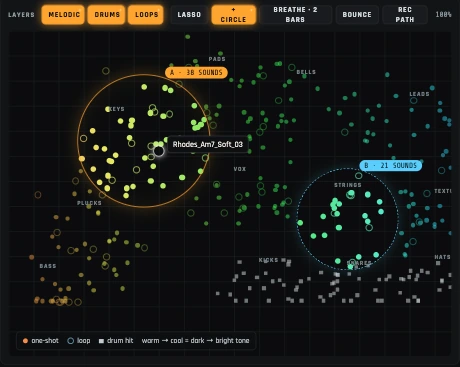
Every sound on one map, grouped by what it is and how it sounds.
- Keys, pads, plucks, bass, vox, strings, leads, kicks, snares and hats each find their own neighbourhood; warm to cool runs dark to bright tone.
- Draw circles or lasso a region to make a pool; turn on Melodic, Drums and Loops layers.
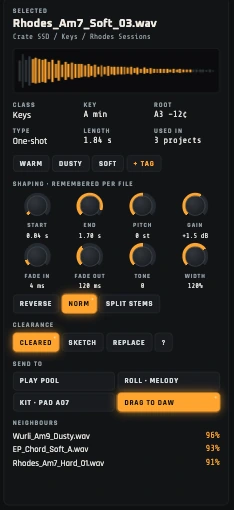
- Results show key, BPM, length, tags, match and clearance, with Sync, Match Key, Start on Bar and MIDI audition.
- The selected sound keeps its shaping per file (start, end, pitch, gain, fades, tone, width), shows its neighbours, and sends straight to Play, Roll, a Kit pad or your DAW.
Play the crate.
Your pool becomes an instrument.
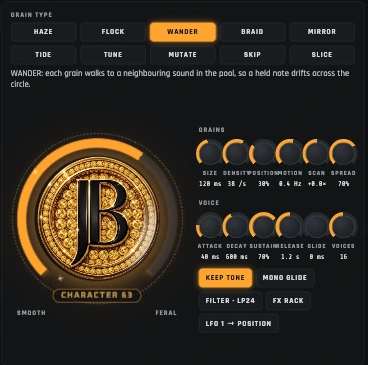
- A grain engine with 10 grain types: Haze, Flock, Wander, Braid, Mirror, Tide, Tune, Mutate, Skip and Slice. Wander lets each grain walk to a neighbouring sound, so a held note drifts across the circle.
- The Character coin turns it from smooth to feral; size, density, position, motion, scan and spread shape the grains.
- Circles breathe and bounce across the map, or record a path for the sound to follow.
- Full voice control (attack, decay, sustain, release, glide, up to 16 voices), Keep Tone, Mono Glide, a filter, an FX rack and LFOs.
Samples in. Instrument out.
Build a synth from your sounds and play it in key.
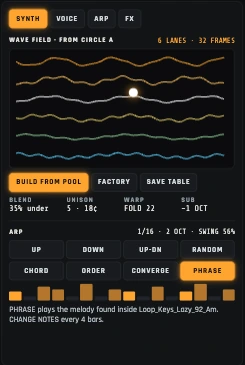
- Wave field: build a wavetable straight from the pool (6 lanes, 32 frames) with blend, unison, warp and sub.
- Arp: up, down, up-down, random, chord, order, converge and Phrase, which plays the melody it finds inside a loop and changes notes every few bars.
- Chords: capture, a key zone, Dice, voicings and strum, with chord sets like Dusty Minor on the keyboard.

Kits that belong together.
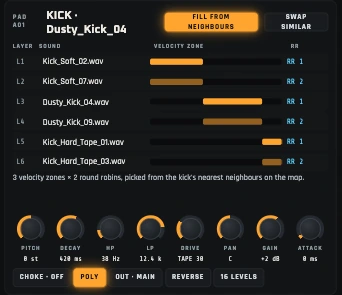
16 pads, 8 kits, filled from the map.
- Fill from Neighbours builds velocity layers and round robins from each sound's closest matches; Swap Similar, Reroll and Match Cohesion keep the kit sounding like one kit.
- Per pad: pitch, decay, filters, tape drive, pan, gain, attack, choke groups, poly, reverse and 16 levels.
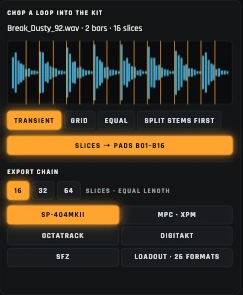
- Chop a loop by transient, grid or equal slices, split stems first, and send the slices to the pads.
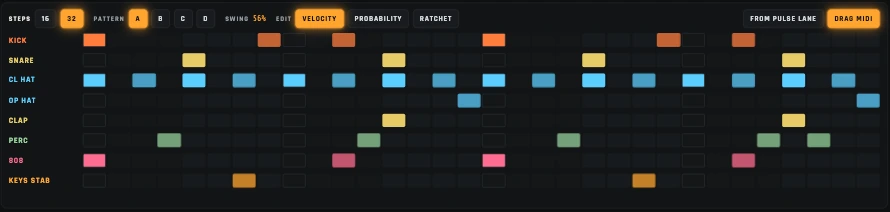
- A 16/32-step sequencer with patterns A–D, swing, velocity, probability and ratchet; drag the MIDI out.
Straight to your sampler.
Take the kit to the machine you play live.
- Export the kit for the SP-404MKII, MPC (XPM), Octatrack, Digitakt or SFZ, with 26 formats in all through Loadout.
- Choose 16, 32 or 64 slices of equal length for the chain.
- Built for the same studio as JBOS: dig on the computer, play it on the MPC.
From the find to the song.
Lay it out, hit the picture, export the session.
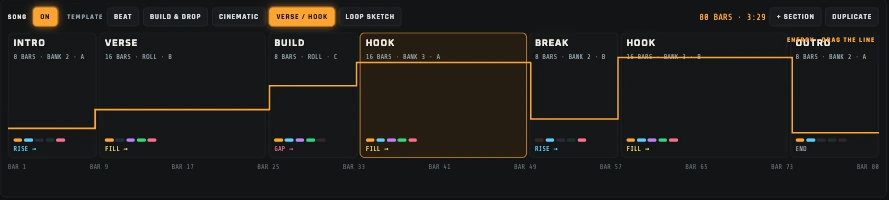
- Templates: Beat, Build & Drop, Cinematic, Verse/Hook and Loop Sketch. Add sections and drag the energy line to shape the arrangement.
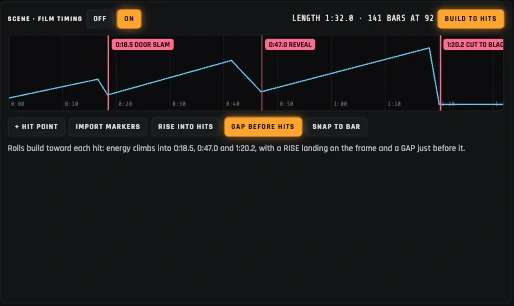
- Film timing: add hit points or import markers, and rolls build toward each hit with a rise on the frame and a gap just before it, snapped to the bar.
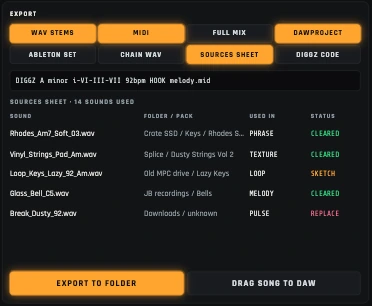
- Export WAV stems, MIDI, the full mix, a DAWproject or Ableton set, a chain WAV, or a Diggz code to share the idea. Export to a folder or drag the song into your DAW.
Know what's cleared.
Ready for the label, the client and the sync.
- Mark every sound Cleared, Sketch or Replace; results show the status before you use it.
- Every export comes with a sources sheet: each sound, where it came from, what it plays and its status.
- Sounds marked Replace are flagged, so nothing uncleared slips into a release.
Crate Diggz Specs
What it is
Sample finder, instrument, kit builder and song sketcher in one plugin
Rooms
Dig, Play, Roll, Kit, Song and Crate
Formats
AU, VST3 and CLAP
Systems
macOS (Apple Silicon + Intel) and Windows
Session link
Follows your DAW's tempo, key and bar; MIDI out; Diggz codes to copy and paste ideas
Exports
WAV stems, MIDI, full mix, DAWproject, Ableton set, chain WAV, 26 kit formats

Start Diggin
Be first to hear when Crate Diggz is ready, plus release news for every JB plugin. No spam.
System requirements
- macOS10.13 or higher (Intel/Mac)
- WindowsWindows 10 or 11 (64-bit)
- RAM4GB minimum (8GB recommended)
Plugin formats
Compatible with all major DAWs
 Ableton Live
 Audacity
 Cakewalk
 Cubase
 Fender Studio Pro
 FL Studio
 GarageBand
 Logic Pro
 Mixcraft
 Pro Tools
 Reaper
 Reason 13+
 Studio One
 Waveform
 Digital Performer
 Bitwig Studio
 ACID Pro
 Nuendo
Don’t see your DAW? As long as it supports VST3, AU or CLAP plugins it should work just fine. Try a free JB plugin to test compatibility for yourself.