

JBOne
The whole master in one window. Ten stages, one coin, and the meters that tell you what Spotify, Apple and YouTube will actually do to it.
AU · VST3 · CLAP // macOS (Apple Silicon + Intel) · Windows
Interface preview · preset Film · Trailer Punch · target Spotify −14 LUFS / −1 dBTP
Why One
Most mastering chains are six plugins, six windows and a guess about what happens after upload. JB ONE puts every stage in one view and checks the result the way the platforms will play it.
Ten stages. One signal flow.
Every step of the master, in the order the audio hears it.
- 1In
- 2Tone
- 3Clean-Up
- 4Color
- 5Dynamics
- 6Space
- 7One
- 8Ceiling
- 9Dither
- 10Out
- Click any stage to jump to its panel. Each one has its own on/off so you can hear what it adds.
- The Full view shows the whole chain; the Spectrum, Gain, EQ, Stereo, Reference and Delivery tabs zoom in on one job, and Ears Only hides the numbers so you just listen.
The ONE coin
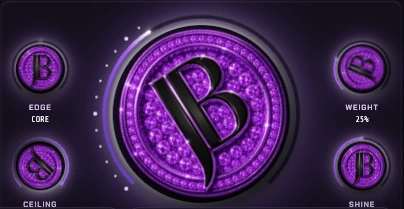
Turn the coin and the master comes up together.
- The big purple JB coin is the finish control: one move for level, density and polish, with a ring of light that shows how far you've gone.
- Edge picks the character, from Core outward. Weight adds body underneath.
- Ceiling sets the true-peak limit. Shine adds air and sparkle on top.
Start clean.
Level it, shape it, take out what doesn't belong.
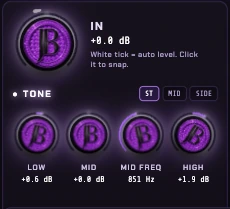
- In auto-levels the input: the white tick shows the ideal level, click it to snap.
- Tone: low, mid with a sweepable mid frequency, and high, on the stereo mix or on the mid or side alone.
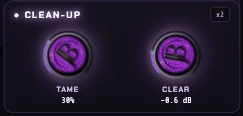
- Clean-Up: Tame smooths harsh, ringing build-ups and Clear takes out mud, with a x2 mode for heavier jobs.
Give it color.
Analog character without the rack.
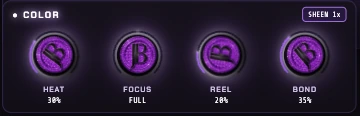
- Heat for warm saturation and Reel for the tape feel.
- Focus chooses where the color lands, from the full range down to one part of the mix.
- Bond glues the mix together; Sheen adds a silky top, 1x or more.
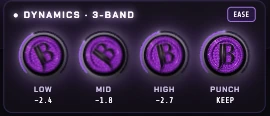
Control. Keep the punch.
Three bands of control that don't flatten the hit.
- Separate low, mid and high bands, each with its own amount of control.
- Punch set to Keep holds on to the transients while the bands do their job.
- Ease makes it gentler and smoother for acoustic, vocal and film work.
- The gain waveform shows exactly where and how hard it's working.
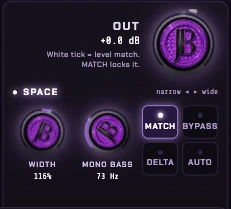
Wide on top. Solid underneath.
Width you can trust, and a fair A/B every time.
- Width from narrow to wide, with Mono Bass keeping the low end centred below the frequency you choose.
- Match level-matches the output so before and after play at the same loudness. Match locks it.
- Delta plays only what JB ONE changed. Bypass and Auto sit right next to it.
Know before you upload.
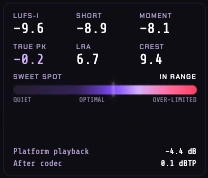
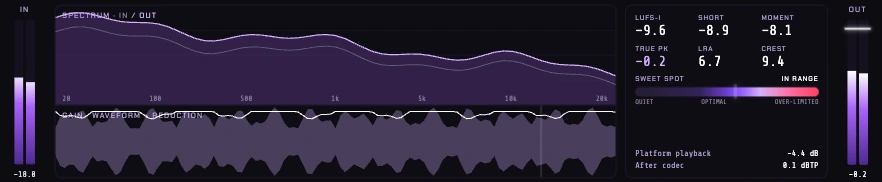
Pick a target. JB ONE tells you if you're in range.
- Targets like Spotify −14 LUFS / −1 dBTP set the goal; the sweet spot bar runs from quiet through optimal to over-limited and says when you're in range.
- Integrated, short-term and momentary LUFS, true peak, LRA and crest on screen the whole time.
- Platform playback shows how much the service will turn you down, and after codec shows your true peak once it's encoded.
- In and out meters, the spectrum in and out, and the gain-reduction waveform.
- DC removal, True Peak limiting and a Classic mode up top.
Hear it their way.
Check the master on the systems and services people really use.
- Codec preview plays the master through the platform's encoder, Spotify OGG and more.
- Speaker modes from Studio on down, plus Mono, so you know it holds up on phones and in cars.
- Normalize plays it at the level the platform will, so a louder master doesn't win by default.
- Dither 24-bit (and lower for delivery) and Mode HQ with 8x oversampling.

Fast to finish.
Presets to start, snapshots to decide.
- Presets by genre and job, like Film · Trailer Punch, with favorites.
- A, B, C and D snapshots to compare four versions of the master, with undo and redo.
- Light on the CPU: the full chain in HQ runs at around 4% in the preview session.

JB ONE Specs
What it is
A complete mastering chain in one plugin
Stages
In, Tone, Clean-Up, Color, Dynamics, Space, One, Ceiling, Dither, Out
Formats
AU, VST3 and CLAP
Systems
macOS (Apple Silicon + Intel) and Windows
Quality
HQ mode with 8x oversampling; true-peak ceiling
Metering
LUFS integrated, short-term and momentary, true peak, LRA, crest, after-codec peak

Get JB ONE
Be first to hear when JB ONE is ready, plus release news for every JB plugin. No spam.
System requirements
- macOS10.13 or higher (Intel/Mac)
- WindowsWindows 10 or 11 (64-bit)
- RAM4GB minimum (8GB recommended)
Plugin formats
Compatible with all major DAWs
 Ableton Live
 Audacity
 Cakewalk
 Cubase
 Fender Studio Pro
 FL Studio
 GarageBand
 Logic Pro
 Mixcraft
 Pro Tools
 Reaper
 Reason 13+
 Studio One
 Waveform
 Digital Performer
 Bitwig Studio
 ACID Pro
 Nuendo
Don’t see your DAW? As long as it supports VST3, AU or CLAP plugins it should work just fine. Try a free JB plugin to test compatibility for yourself.